
7.4 KiB
7.4 KiB
Vite 整合 Electron 总结
前言
- Vite 是面向未来几年的构建工具,很有必要在各个场景下都试试集成进来
- Electron 作为前端标配的桌面开发工具
@vue/cli官方有给出模板 但是 Vite 这块并没提供,毕竟人家定位是和webpack那样的通用构建工具,甚至连 Vue 都没集成 🖖 那么 Electron 这块集成设计思路按照 vue 的集成风格,应当写一个插件!
注意 📢
- 这里假定你简单的知道一些 Vite 的工作原理,这种文章网上有好多的
- 项目整体所有代码在这 https://github.com/caoxiemeihao/electron-vue-vite 可以直接 用于生产 (还要辛苦各位亲点个 start 😘)
插件设计分析
- Vite 在开发期可以简单的理解为用的
koa+esbuild组合的形式,试想下如果你写了如下代码
// src/render/main.ts
import { createApp } from 'vue'
import App from './App.vue'
import { ipcRenderer } from 'electron'

console.log('ipcRenderer:', ipcRenderer)

createApp(App)
  .mount('#app')
那么可能你会收到下面的报错

- 事实上在
'electron'在 Electron 运行环境中是一个 内置模块 你可以尝试在控制体中试试下这段代码
注意这里先不要引入 Electron 相关的包,保障项目能跑起来
require.resolve('electron')
"electron" // 将会输出
既然 Electron 本就支持全量的 NodeJs API 我们不妨直接在在代码中直接写成
const { ipcRenderer } = require('electron')
可以打包票说,这个可以用!(仅限开发期);但是这个会带来两个问题
- 编码风格不统一,人家都在用
ESModule混入CommonJs确实不好看 require('xxxx')在打包期间如果不做些处理,并不会被 Rollup 处理 (这里只.ts文件,有大神知道怎么对付这种情况的请指点下小弟) 如果你引入的是node_modules中的包那可就惨了;比如require('electron-store')这种会原样输出;打包后的程序开起来会找不到'electron-store'这个模块,铁定报错!
- 以上两点表现了
ESModule写法在开发期直接运行会报错;如果我们告诉 Vite 这个是内置的模块,不要去处理直岂不是切角柜解决报错了; 思路是把 ESModule 转换成 NodeJs 内置的 CommonJs 形式即可;甚至只要有关 NodeJs API 的包我们都可以转化,毕竟开发期项目根目录是有node_modules这个 NodeJs包仓库 给你用的! 我们可以先去启动好的项目控制台中试试
注意这里先不要引入 Electron 相关的包,保障项目能跑起来
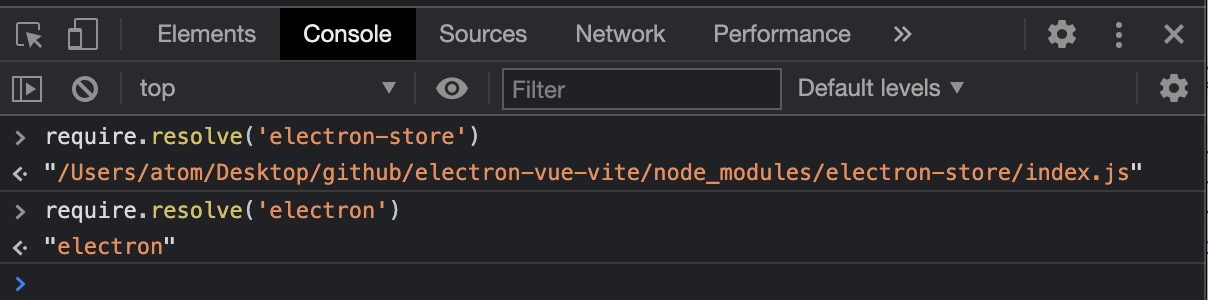
这两个包开发环境下能够正常加载! 很好!那按照我们的假设,预期的代码行为应该是这样:
import { ipcRenderer } from 'electron'
import Store from 'electron-store'
// Will generate
const { ipcRenderer } = require("electron")
const Store = require("electron-store")
- 分析至此,我们该动动手写个插件了;让插件去自动化完成
esm2cjs
vitejs-plugin-electron
- Vite 插件上手教程请看官网 https://vitejs.dev/guide/api-plugin.html (我个人觉得比
webpack那边的插件要好写) - 为了支持传参方便日后扩展,我们把它成一个 Function 并返回一个插件
- 代码处理这块,我们需要一个 AST 工具帮忙 -
yarn add acorn
import * as acorn from 'acorn'
import { Plugin as VitePlugin } from 'vite'

const extensions = ['.js', '.jsx', '.ts', '.tsx', '.vue'] // 需要处理的文件后缀

export interface Esm2cjsOptions {
  excludes?: string[] // 需要被转换的模块
}

export default function esm2cjs(options?: Esm2cjsOptions): VitePlugin {
  const opts: Esm2cjsOptions = {
    // 默认我们转换 electron、electron-store 两个模块
    excludes: [
      'electron',
      'electron-store',
    ],
    ...options
  }

  return {
    name: 'vitejs-plugin-electron', // 这个 name 就是插件名字
    transform(code, id) {
      const parsed = path.parse(id) // 解析引入模块的路径,id 即引入文件完整路径
      if (!extensions.includes(parsed.ext)) return // 只处理需要处理的文件后缀

      const node: any = acorn.parse(code, { // 使用 acorn 解析 ESTree
        ecmaVersion: 'latest', // 指定按照最新的 es 模块标准解析
        sourceType: 'module', // 指定按照模块进行解析
      })

      let codeRet = code
      node.body.reverse().forEach((item) => {
        if (item.type !== 'ImportDeclaration') return // 跳过非 import 语句
        if (!opts.excludes.includes(item.source.value)) return // 跳过不要转换的模块

        /**
         * 下面这些 const 声明用来确定 import 的写法
         */
        const statr = codeRet.substring(0, item.start)
        const end = codeRet.substring(item.end)
        const deft = item.specifiers.find(({ type }) => type === 'ImportDefaultSpecifier')
        const deftModule = deft ? deft.local.name : ''
        const nameAs = item.specifiers.find(({ type }) => type === 'ImportNamespaceSpecifier')
        const nameAsModule = nameAs ? nameAs.local.name : ''
        const modules = item.
          specifiers
          .filter((({ type }) => type === 'ImportSpecifier'))
          .reduce((acc, cur) => acc.concat(cur.imported.name), [])

        /**
         * 这里开始根据各种 import 语法做转换
         */
        if (nameAsModule) {
          // import * as name from
          codeRet = `${statr}const ${nameAsModule} = require(${item.source.raw})${end}`
        } else if (deftModule && !modules.length) {
          // import name from 'mod'
          codeRet = `${statr}const ${deftModule} = require(${item.source.raw})${end}`
        } else if (deftModule && modules.length) {
          // import name, { name2, name3 } from 'mod'
          codeRet = `${statr}const ${deftModule} = require(${item.source.raw})
 const { ${modules.join(', ')} } = ${deftModule}${end}`
        } else {
          // import { name1, name2 } from 'mod'
          codeRet = `${statr}const { ${modules.join(', ')} } = require(${item.source.raw})${end}`
        }
      })

      return codeRet
    },
  }
}
- 在
vite.config.ts中使用vitejs-plugin-electron
import { defineConfig } from 'vite'
import vue from '@vitejs/plugin-vue'
import electron from 'vitejs-plugin-electron'

export default defineConfig((env) => ({
  plugins: [
    vue(),
    electron(),
  ],
  // 其他配置略...
}))
-
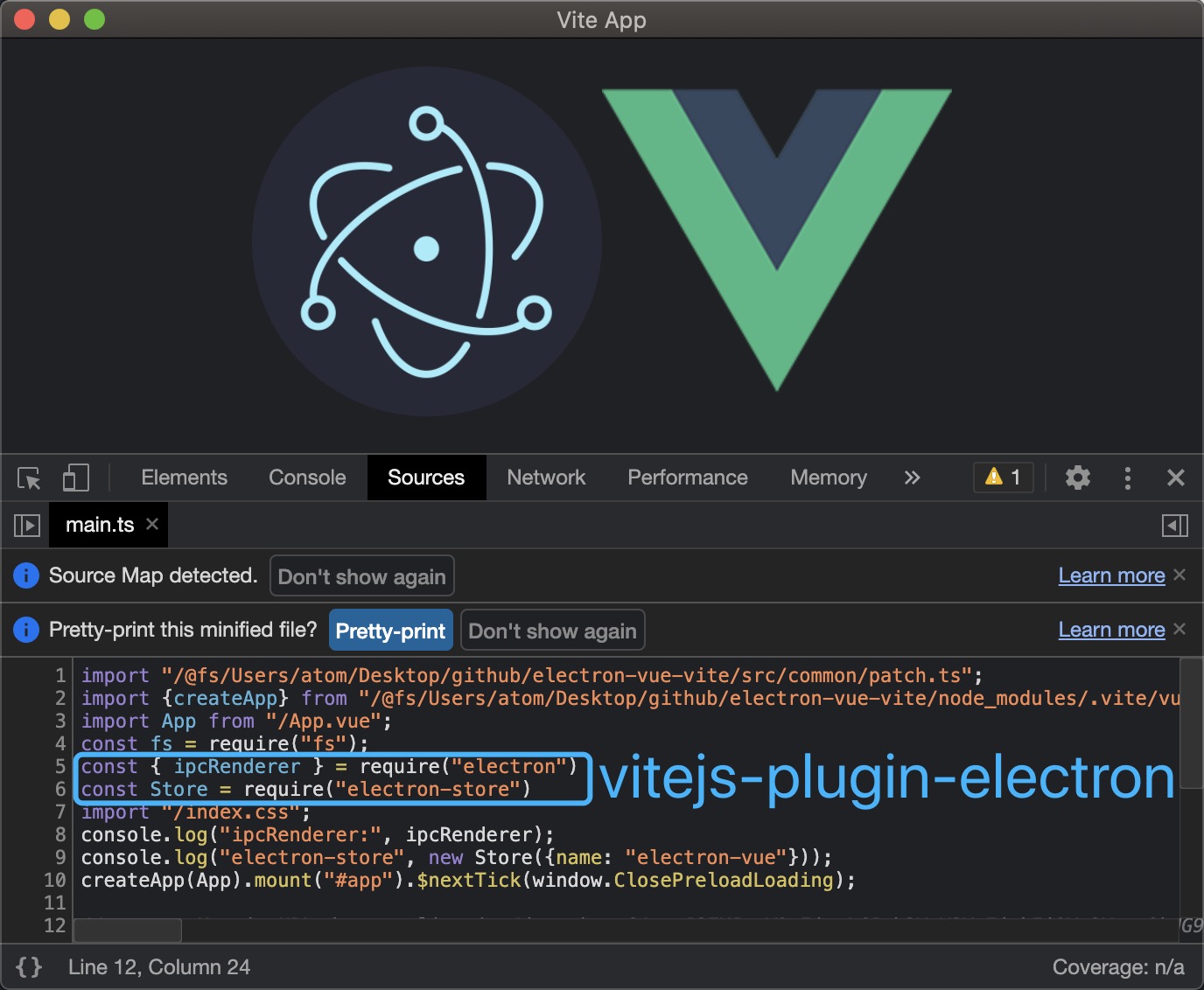
再次运行下项目
-
It's Worked! 🎉 🎉 🎉
-
细心的童鞋可能发现了我们的代码上面还有一行
const fs = require("fs");
看到这个我有点懵,我也是开起来项目时候才发现的这,看来关于原生 API 人家 Vite 也是这么干的?可以我没有证据(源码还没看完),不过这确实不是我干的 😂
- 好了,这个插件可以用了;再想想上面的关于 Rollup 的配置其实我们完全可以集成到
vitejs-plugin-electron中的,这样会使vite.config.ts文件更少、更清晰;具体代码就不演示了,自己拉代码看看吧 🚀 - https://github.com/caoxiemeihao/vitejs-plugins/tree/main/electron